
This website exists for one practical purpose: give a prospective student or family enough verified information to decide whether to contact admissions, then make that contact direct. Everything published is organised to support that journey — campus evidence, admissions hierarchy, academic direction, and dated updates — without requiring you to chase several channels.
The structure follows patterns that hold at very different scales. Large research universities such as Harvard group news and events editorially while keeping faculty and programme discovery compact and navigable; Nigerian universities such as UNILAG and the University of Abuja make admissions and academic structures prominent and utility navigation easy to reach. Hector borrows the principle, not the size: keep discovery clear, keep contact visible, and publish a dated record.
The four areas you will use
1. Campus
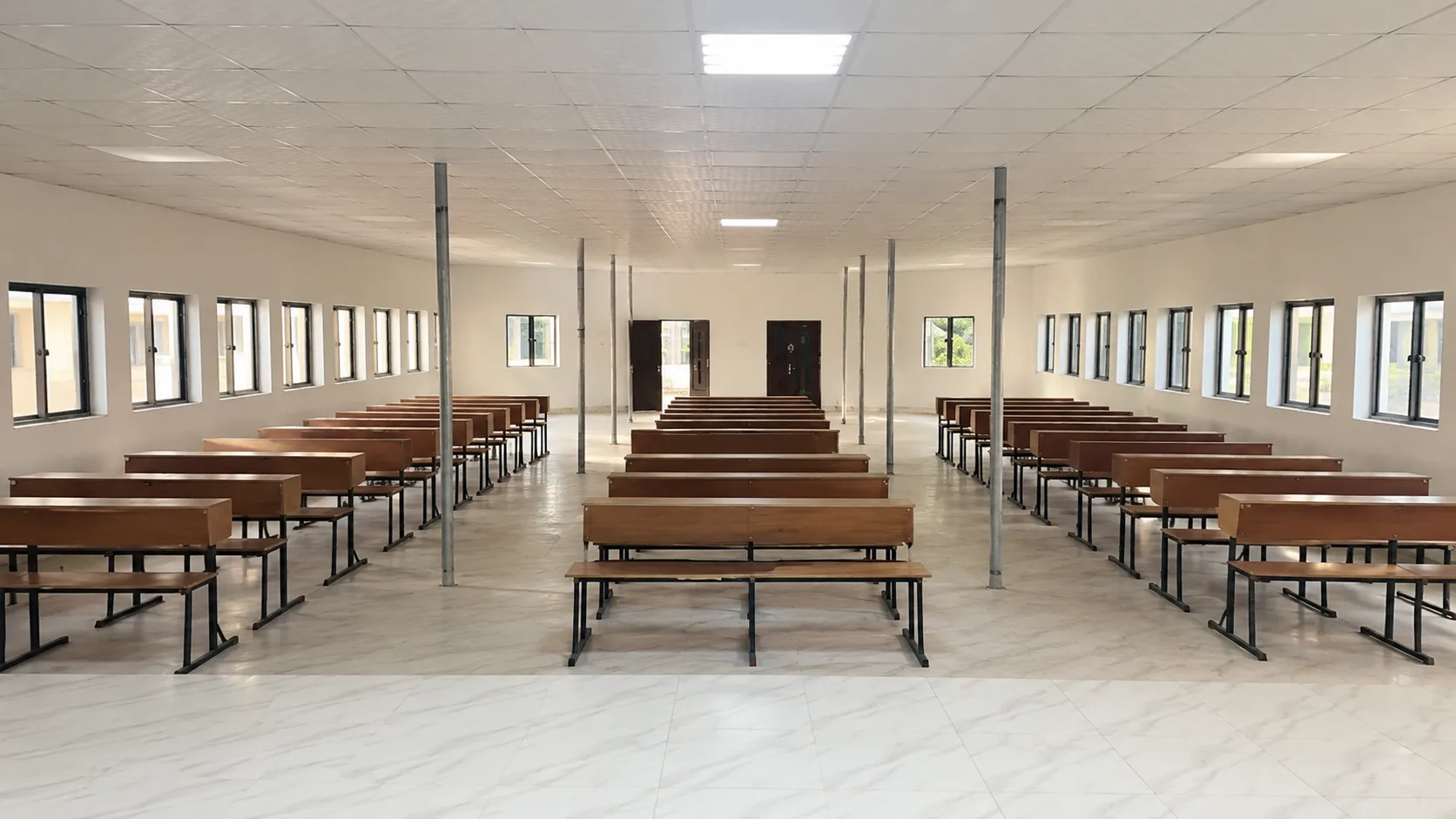
Real photography of the building, lecture room, and computer laboratory anchors every claim about space. Each image carries alt text and a factual caption, and video is muted and decorative. If you visit, the address and visit-assistance route are consistent across the site:
- 7 University Avenue, Awe, Oyo 211106, Nigeria
- Arrange through admission@hectoruniversity.com or +234 807 332 5728
- Map link on Campus Life and on the homepage contact section
Future spaces will be added as dated entries with the same treatment. Where no Hector photograph exists, an editorial illustration will be clearly labelled and credited rather than presented as campus.
2. Admissions
Admissions is the spine. The flow is deliberately short:
- Request the guide — email or WhatsApp the official contact with your programme area and qualification
- Confirm your route — receive the programme list, entry requirements, documents, fees, dates, and approved payment instruction for your session
- Keep the reply — use it to verify forms, accounts, and dates later
That is the same checklist used in the detailed admissions article How to contact the admissions team and on the Admissions page. The homepage makes the primary action “Email admissions” and keeps WhatsApp secondary — a hierarchy mirrored on programme and article pages.
3. Academics
Academic pages are split into two layers:
- Overview on Academics — teaching principles: clear instruction, guided practice, published requirements, and how the campus spaces map to the work you will do
- Detail on each programme page — for example, Computer Science, Business Administration, and Economics — with faculty, degree, summary, duration, and a note to confirm entry details for the current session
This mirrors the faculty-to-department-to-programme filtering seen at Kwara State University: faculties group programmes, departments own the detail, and a filter helps an applicant narrow by interest. At founding scale, Hector keeps three programmes visible and links each to the same verification step through admissions.
4. Launch Journal
The journal is the dated public record. Each article carries:
- Category — University updates, Campus development, Admissions, or Academic life
- Date — the publication date in the header
- Cover and alt text — Hector-owned where available; editorial illustrations otherwise with a visible credit
- Next action — a link that moves you to the relevant page or to admissions contact
Recent entries include campus evidence pieces and the contact guide you are reading. The journal is not a student life feed — Hector has no students to photograph — and it does not publish rankings, employability rates, or accreditation claims that have not been verified.
Utility navigation and structure
The header keeps a compact institutional navigation similar in spirit to MIT’s — a small set of primary sections with a real button for the mobile disclosure, Escape handling, and focus restoration. The footer repeats the essentials: contact, map, and the essential legal links — Privacy and Accessibility — so help remains within one click on any page.
What will be published next
Updates are added as work is completed, not on a fixed calendar. Planned additions, when approved, will follow the same markdown-to-static pipeline:
- Campus development — additional Hector-owned photographs with factual captions as spaces are documented
- Admissions notices — confirmed requirements, dates, documents, and fee guidance for the next session, each tied to a programme and session label
- Academic information — programme detail where the admissions guide can be summarised as enduring information on the programme page
- Visit guidance — practical notes on access, health support, and accommodation plans when they become verified facts
Draft entries are excluded from navigation and from the sitemap until approved. That keeps the published site honest: if an entry is draft, you will not find it through search or the site menu.
How to use this site well
For prospective students and families, a short routine works:
- Start on the homepage for the proof strip and guidance checklist
- Read About for founding purpose and campus location
- Choose a programme path on Academics and open the programme page
- Send the six questions listed in the admissions guide to admission@hectoruniversity.com
- Keep the reply and use it to verify every later step, including payment
For small screens, the campus axis becomes a short section rule; for reduced-motion and data-saving modes, video falls back to its poster. In both cases, all information remains available with JavaScript disabled.
A note on templates
Hector’s site is built static with Astro and Markdown, not from a WordPress marketing template. Earlier templates such as large programme grids, floating price panels, and pill-heavy components were not retained. What remains is restrained: 1240px content width, 2–6px radii, visible borders, and one clear admissions action per view — closer to the calm editorial systems of Oxford and Harvard than to a crowded commercial theme.
If you need something not yet published — fees for a specific programme, exact document checklist, or a visit time — email admissions and keep the written answer. That is the intended use of this site.